I've been running workloads on Kubernetes at work for years now, and probes are everywhere. Every Deployment has them (or should), every Helm chart ships its own opinion about them, and sooner or later every incident call has someone asking "wait, what's the liveness probe on this thing?". Add Kubestronaut prep on top of that, and lately I'm under the impression that I spend more time reading, tuning and troubleshooting probe configs than writing them.
So I wanted to find out whether I could build a neat, handy little tool for it. That tool is kubectl probes, and it's my first kubectl plugin.
This post isn't the pitch; the project page does that. This one is about how it got built: a week of reading someone else's code, vibe coding my own, a dashboard I got way too excited about and then deleted, and a few things about the Kubernetes API that look different once you have to write code against them.
A handful of numbers
A probe is a handler and five numbers. What those numbers add up to is never on your screen. periodSeconds: 30 with failureThreshold: 3 looks harmless. It's also up to 90 seconds of traffic going to a container that is already broken. Not that I'd know anything about that. 🙃
Here's what kubectl describe gives you for the Postgres pod in my demo cluster:
$ kubectl -n shop describe pod postgres-0 | grep -E "^ +(Liveness|Readiness):" Liveness: exec [pg_isready -U shop] delay=45s timeout=30s period=20s successThreshold=1 failureThreshold=3 Readiness: exec [pg_isready -U shop -d shop] delay=0s timeout=3s period=5s successThreshold=1 failureThreshold=3All the facts are there. What isn't there: that liveness waits 45 seconds before its first check, that its 30-second timeout is longer than its own 20-second period, and that once Postgres stops answering, nothing restarts it for a full minute. Now do that arithmetic for every container in a namespace, once per replica, with the Unhealthy events sitting in a separate section of every single pod.
It's not a hard problem, IMHO. It's a tedious one, which makes it a perfect job for a small tool.
The plugins I live in
I use a bunch of kubectl plugins every day, and the two at the top of the list are both by Ahmet Alp Balkan: kubectx (and its sibling kubens), which I've been using for 8 years now, and kubectl node-resource, for when I want to know how full my nodes actually are.
What I like about Ahmet's plugins is that they're clear, well scoped and efficient. They do one thing and they do it well. No config file, no TUI, no dashboard. You type a command, you get an answer, you move on. That was the bar I had in my head.
A week inside someone else's plugins
Before writing a single line of my own, I took a week to properly understand how these work. I used Matt Pocock's skills for Claude Code, especially /teach. If you haven't tried it: you give it a mission ("I want to understand how a kubectl plugin talks to the cluster, well enough to write one") and it turns a folder into a small course, with lessons, reference sheets, and learning records of what you actually understood, so every session starts where the last one left off.
I pointed it at kubectx and node-resource and went through both recursively, from main down to the last API call and back up to the output. Some of what I took away:
- Scope is a feature. kubectx is
kubectx [name]: a few flags, one optional positional, nothing else. kubectl probes ended up shaped exactly like that:kubectl probesfor a namespace,kubectl probes deploy/webfor one workload. No subcommands to remember. - Don't reinvent the flags. node-resource builds on
k8s.io/cli-runtime, which gives you--context,--kubeconfig,-n,--asand friends for free, parsed exactly the way kubectl parses them. Nobody has to learn anything new to use your plugin. - Borrow the good bits. node-resource can end its output with a summary, or print only that with
--summary=only: a distribution with histograms, so you see the whole cluster at a glance. I liked it so much that kubectl probes has the same flag, the same six percentile rows, and the same kind of histogram. You'll see it further down.
Only once I felt like I could explain those two codebases to someone else did I start on mine.
Then I vibe coded it (with some paperwork)
Let's be honest: I vibe coded kubectl probes. Claude Code wrote most of the Go. ¯\_(ツ)_/¯
But I didn't want it to become the kind of vibe-coded project where nobody, including me, knows why anything is the way it is. So I leaned on Matt's skills again, and the repo has the paperwork to show for it:
- A glossary (
CONTEXT.md) with the words the plugin uses and the ones it avoids. A workload is the top-most owner of a set of pods, a finding is an opinion and never a fact, and so on. Sounds pedantic, but it's why the output, the docs and the code all say the same thing. - ADRs, 10 of them so far, for every decision I'd otherwise re-argue with myself a week later: the plugin is read-only, it trusts the running pod's spec over the template, a set of
-ffiles is read as one cluster... - Issues as tickets. Every piece of work started as a GitHub issue, small enough to review in one sitting.
- Golden-file tests that run the whole pipeline against fixtures, no cluster needed.
- A demo cluster in the repo, on kind or minikube, where every rule has something to fire on, plus a
make chaosthat breaks two probes on purpose. It was the release gate, and yes, it caught bugs before v0.1.0.
It was supposed to be a little tool. It didn't stay little for long, which brings me to...
The dashboard I built, and then deleted
I got ahead of myself. As I tend to do.
Sam Rose wrote a gorgeous interactive essay about probes for ngrok: a kubelet, pods, containers changing colour, every probe check pulsing across the screen. I read it and thought: what if kubectl probes had that, but for your real cluster? 🔥
So on a Sunday afternoon I vibed it. kubectl probes --serve started a local web server, streamed the report to the browser over Server-Sent Events, drew the pods and the kubelet as a diagram, and had a timeline you could scrub. It was fun to build. It even worked.
Then I ran it against the demo cluster mid-chaos, and it hit me: a real cluster doesn't give you those pulses. That essay runs on webernetes, a Kubernetes that lives in the browser, with a simulated cluster and a simulated clock. In a real one, a probe that passes leaves no trace in the API server at all, and a failing one shows up as a deduplicated, rate-limited event (more on that below). The only honest thing my dashboard could draw was what the terminal already printed, just slower and prettier. It showed exactly two things the CLI couldn't: which node the failures were on, and whether they bunched up in time.
Monday morning I took it out of the release and hid it behind a build tag, "just in case". Monday night I deleted it. About 6,000 lines, gone. There's even an ADR whose whole point is that there is no dashboard. 😅
I struggled with scoping on this one, and even more with sticking to the scope once I'd set it. What made me want a plugin in the first place was Ahmet's "one thing, done well", and I almost built the exact opposite. A browser surface is a second product. And hiding it behind a build tag "just in case" didn't make it free: it still cost CI time and attention on every single change, for something nobody would ever run.
What it looks like
Everything below is the demo cluster from the repo, running on minikube, right after make chaos pointed web's readiness probe and catalog's liveness probe at paths that answer 404.
Worst first
One row per container. Each probe column shows the handler and the one duration that probe is read for: the whole budget for startup, and for readiness and liveness the worst case between the container going bad and the probe acting on it. --sort severity puts what's failing at the top.
The row to look at is web. The Deployment asks for 2 replicas, and there are 3 pods: the 2 old ones, plus 1 new one the rollout added, which isn't ready. And there's a * on its readiness cell, which means the running pods no longer match their own template.
The rollout that stalled, quietly
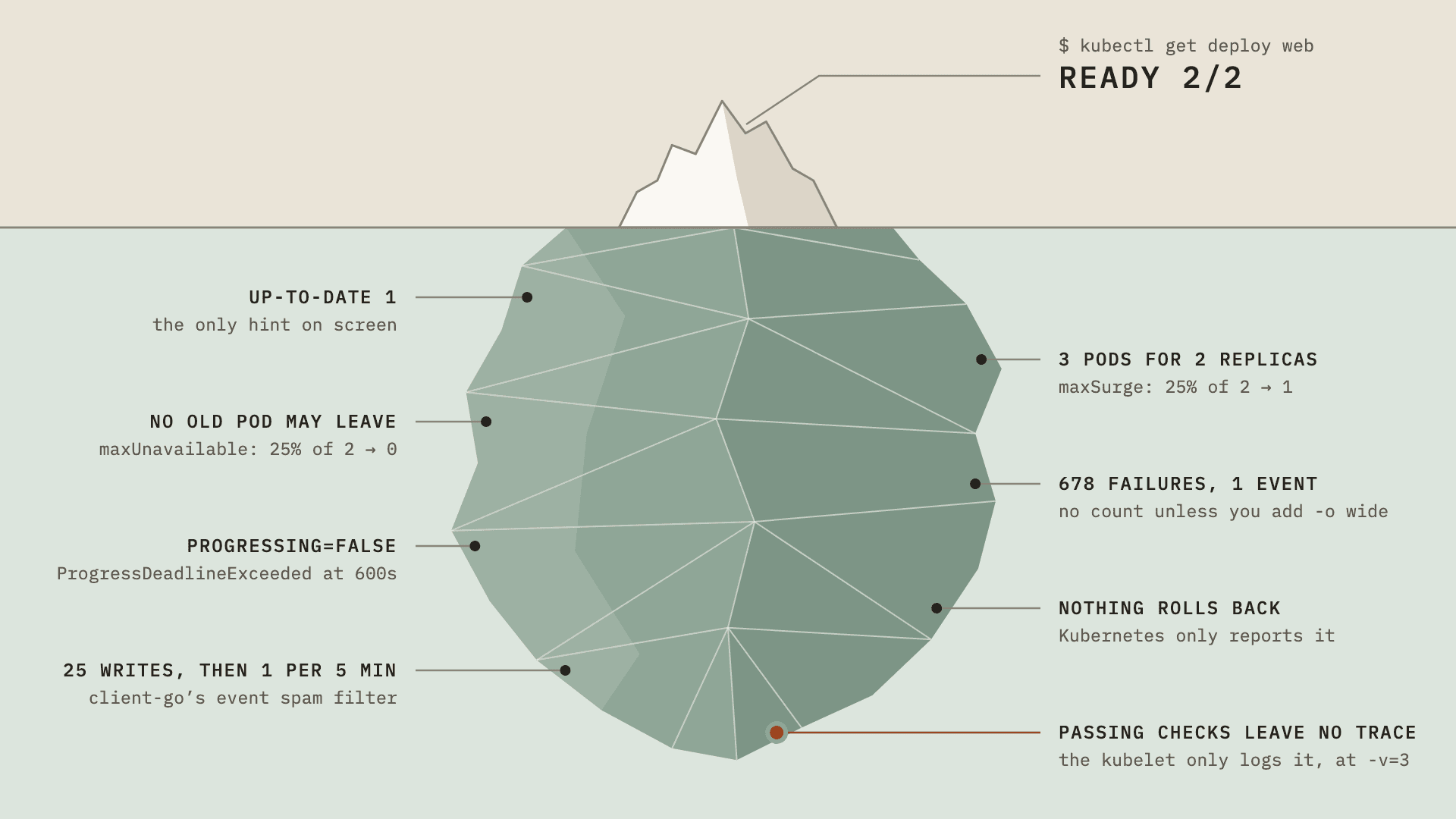
This is my favourite one, because it's the sneakiest. Changing web's readiness path started a rollout. The new pod runs the new probe, fails it, and never becomes ready, so the rollout just... stops there. The two old pods keep serving on the old probe. Nothing restarts, nothing crashes. And kubectl says:
READY 2/2. The only hint is UP-TO-DATE 1.
It doesn't get better with time, either. Ten minutes in (progressDeadlineSeconds defaults to 600), the Deployment's Progressing condition flips to False with ProgressDeadlineExceeded, and that's it. Kubernetes takes no action on a stalled Deployment other than reporting that condition, so nothing rolls back, and get deploy keeps saying 2/2.
Naming the workload puts all the pieces side by side:
The * on the readiness handler and the drift table say what changed: /readyz in the running pods, /readyz-broken in the template. The runtime state names the one pod that isn't ready, and the failure evidence carries the kubelet's own message: status code 404, 124 times in 13 minutes.
Killed by liveness, "Completed, exit 0"
catalog's liveness probe fails 3 times in a row, the kubelet restarts the container, and the last termination reads... Completed, exit 0. That's because the kubelet stops a container that failed liveness the same way it stops any container: SIGTERM and a grace period. An app that shuts down cleanly exits 0. So nothing about how the container exited tells you why. The failure evidence right below it does: the liveness probe, and the 404 it got.
The other two findings were there before anything broke: without a readiness probe the container counts as ready the moment it starts, and its liveness probe gives it the default 1 second to answer.
The pod that looks perfectly healthy
postgres is ready and has never restarted. The findings are about its config, and I'll be honest: I've written this exact config before. More than once. Here are its probes from the manifest:
readinessProbe: exec: command: ["pg_isready", "-U", "shop", "-d", "shop"] periodSeconds: 5 timeoutSeconds: 3 failureThreshold: 3livenessProbe: exec: command: ["pg_isready", "-U", "shop"] initialDelaySeconds: 45 periodSeconds: 20 timeoutSeconds: 30 failureThreshold: 3Somebody measured that Postgres takes a while to come up and wrote that wait into the liveness probe: initialDelaySeconds: 45. That's the liveness probe doing the startup probe's job. It switches liveness off for the first 45 seconds of every start, even when Postgres comes up in a couple of seconds. And if a start ever runs long, say a slow recovery after a crash, liveness has its 3 failures within about 105 seconds (45 + 3 × 20) and restarts Postgres in the middle of it, which starts the slow recovery all over again.
The Kubernetes docs say it directly: if your container usually takes longer to start than initialDelaySeconds + failureThreshold × periodSeconds, add a startup probe that checks the same thing. Liveness and readiness don't run until the startup probe succeeds, so you can give startup a generous budget (failureThreshold × periodSeconds, say 5 minutes) and keep liveness tight for the rest of the container's life.
The second finding is the 30-second timeout on a 20-second period. The kubelet runs one check at a time and doesn't start the next one while the last is still going, so if a check ever does hang for the full 30 seconds, failure takes longer to detect than the 1m the numbers suggest.
The summary, a.k.a. my node-resource homage
This is the part I borrowed from node-resource. Coverage first: how many containers have each kind of probe. Then failure detection as percentiles, each naming its container, so the outlier is one command away. In this cluster the slowest liveness detection belongs to the control plane's own kube-scheduler, at 1m20s.
What I learned
None of the following are secrets, and I knew all of them from running clusters. But writing code against something is a different game: every "yeah, I know" turned into "okay, but what exactly happens when...".
A passing probe leaves no trace
The kubelet runs the probes, and it only tells the API server when something happens. A probe that passes leaves nothing you could ever kubectl get. A probe that fails becomes an Unhealthy Event, and Events are lossy in ways that matter once you build on top of them. Here's that same stalled web pod, about an hour into the chaos:
$ kubectl -n shop get events --field-selector reason=Unhealthy,involvedObject.name=web-58b7b6f6f9-n25b2 -o custom-columns=FIRST:.firstTimestamp,LAST:.lastTimestamp,COUNT:.countFIRST LAST COUNT2026-09-29T13:37:04Z 2026-09-29T14:32:04Z 678A readiness probe failing every 5 seconds for 55 minutes, stored as one Event object with a counter. It gets better: client-go's event recorder, which the kubelet uses, rate-limits per object. It lets 25 events through, then writes at most once every 5 minutes, carrying the running count with it. That's why the screenshot above said "last seen 3m7s ago" for a probe that fails every 5 seconds. And then Events expire, after 1 hour by default (the API server's --event-ttl).
This is also what killed the dashboard, as you saw. You can't animate data that was never recorded.
Controllers create down, owners point up
You know the hierarchy: a Deployment has ReplicaSets, a ReplicaSet has Pods. What's worth being precise about is which way the API records that relationship. The controllers work top-down: the Deployment controller creates a ReplicaSet, the ReplicaSet controller creates Pods. But the link is written on the child, pointing up:
$ kubectl -n shop get pod web-58b7b6f6f9-n25b2 -o json | jq -c '.metadata.ownerReferences[] | {kind, name, controller}'{"kind":"ReplicaSet","name":"web-58b7b6f6f9","controller":true}$ kubectl -n shop get rs web-58b7b6f6f9 -o json | jq -c '.metadata.ownerReferences[] | {kind, name, controller}'{"kind":"Deployment","name":"web","controller":true}$ kubectl -n shop get deploy web -o json | jq -c '.metadata.ownerReferences'nullNothing on the Deployment object lists its ReplicaSets or its Pods. Every link lives on the child as an ownerReference, with controller: true on the one that manages it. It's the same pointer the garbage collector follows for cascading deletes: delete the Deployment, and everything whose owner chain leads back to it goes too.
Why start from the pods and not the templates? Because mid-rollout they disagree, and that disagreement is exactly the * from the stalled rollout.
The API server fills in the blanks
Here's the readiness probe from that Postgres manifest again, as it lives on the running pod:
$ kubectl -n shop get pod postgres-0 -o json | jq '.spec.containers[0].readinessProbe'{ "exec": { "command": [ "pg_isready", "-U", "shop", "-d", "shop" ] }, "failureThreshold": 3, "periodSeconds": 5, "successThreshold": 1, "timeoutSeconds": 3}The manifest never set successThreshold. The API server wrote the default in when the pod was created, and it does that for every probe field except initialDelaySeconds. So on a running pod, "left unset" and "explicitly set to the default" look exactly the same.
That one changed a design decision. I wanted the detailed view to mark defaults as defaults, and on a live pod there's almost nothing left to mark. So the plugin shows a default in gray, like the 0s delays in the screenshots, and the JSON report still tells the two apart wherever it can, for example in a manifest read with -f.
A plugin is just a binary on your PATH
Any executable called kubectl-<something> on your PATH is a kubectl plugin. That's the whole contract:
#!/usr/bin/env bashecho "hello from a kubectl plugin, context: $(kubectl config current-context)"$ kubectl hellohello from a kubectl plugin, context: probes-demoUnderscores in the name become dashes, which is why Ahmet's binary is kubectl-node_resource and you type kubectl node-resource. Everything else is convention: cli-runtime for the flags, goreleaser to build archives for 5 platforms, and krew to find, install and upgrade plugins. The mechanism took 2 lines to understand. The conventions around it are what took a week of reading.
What's next
v0.1.0 is out. Grab an archive from the releases, or:
go install github.com/mertdotcc/kubectl-probes@latestIt's also submitted to krew-index and waiting for review, so kubectl krew install probes should work soon. 👀
If you want to poke at it without pointing it at a real cluster, the repo ships the same demo cluster I used for every screenshot in this post:
cd hack/demo-clustermake up # or: make up TOOL=minikubemake chaoskubectl probes -n shopAnd I already have a couple more ideas for plugins, all aimed at real pain points of mine. Next up is kubectl svc-why: why is this Service returning 503, or showing no endpoints? It walks the request path and tells you where it breaks first. After that, there are ideas around CronJobs, startup time and NetworkPolicies sitting in my notes. Same rule for all of them: one thing, done well.
Wrapping up
I enjoyed this a lot. More than I expected, honestly.
Reading someone else's code slowly, with a tutor that makes you explain it back, is a completely different experience from skimming a repo. Vibe coding on top of that understanding felt less like gambling and more like pairing. And deleting 6,000 lines taught me more about scope than I'd like to admit.
If you try kubectl probes and it tells you something wrong, or fails to tell you something it should, open an issue. There's literally one called "Dogfood log: what kubectl probes failed to tell me on a real cluster", and I'd love your entries in it.
Further Reading & References
- kubectl probes on GitHub, with the ADRs under
docs/adr/ - kubectx and kubens (Ahmet Alp Balkan)
- kubectl node-resource (Ahmet Alp Balkan)
- Skills for Real Engineers (Matt Pocock)
- 🔥 Probes, the interactive essay (Sam Rose, ngrok)
- Kubernetes Docs: Configure Liveness, Readiness and Startup Probes
- Kubernetes Docs: Owners and Dependents
- Kubernetes Docs: Extend kubectl with plugins
- krew, the kubectl plugin manager