Jetic AI was a product I proposed at Datagrate in 2025. The idea: let large companies build AI agents that work with their business systems, and run those agents on their own Kubernetes clusters, where their data already lives. I did the research, defined the product and built the prototype.
The problem
Large companies connect dozens of systems: Salesforce, SAP, ServiceNow, databases, message queues. The recurring ways of doing that have names, the enterprise integration patterns, and Apache Camel is the most widely used framework that implements them. It ships hundreds of ready-made connectors, and patterns such as change data capture, load balancing and wire tap. Camel K runs Camel integrations natively on Kubernetes.
Jetic, Datagrate's product, is a visual integration platform built on Camel K. Its customers are enterprises with complex integration needs, in industries such as banking, payments and manufacturing, and they run Jetic's integrations on Kubernetes clusters of their own. Jetic glues open-source software together and makes it easier to install and use, without locking anyone in: customers can take their integrations and leave. Anything new had to follow the same principle.
By 2025, AI agents had arrived, and so had visual tools for building them, such as Zapier Agents, n8n's AI Agent node and Langflow. I built agents with each of them, to learn what they did well and what Jetic's customers would still be missing. They showed that people can build agents by dragging and connecting blocks, the same way Jetic users already built integrations. But the hosted tools run your agents on the vendor's servers, and the self-hosted ones have far fewer enterprise connectors than Camel and weren't built with a hardened, regulated Kubernetes cluster in mind. For a company whose agents would handle customer data under strict regulation, that doesn't work. The data can't go to a third-party service, and the company has to be able to see and control everything that runs.
The idea
Jetic AI brings agents to where these companies already work:
- Built visually. The same kind of visual builder Jetic already offered for integrations, now for agents.
- Enterprise connectors out of the box. Any Camel connector becomes a tool the agent can call, over MCP.
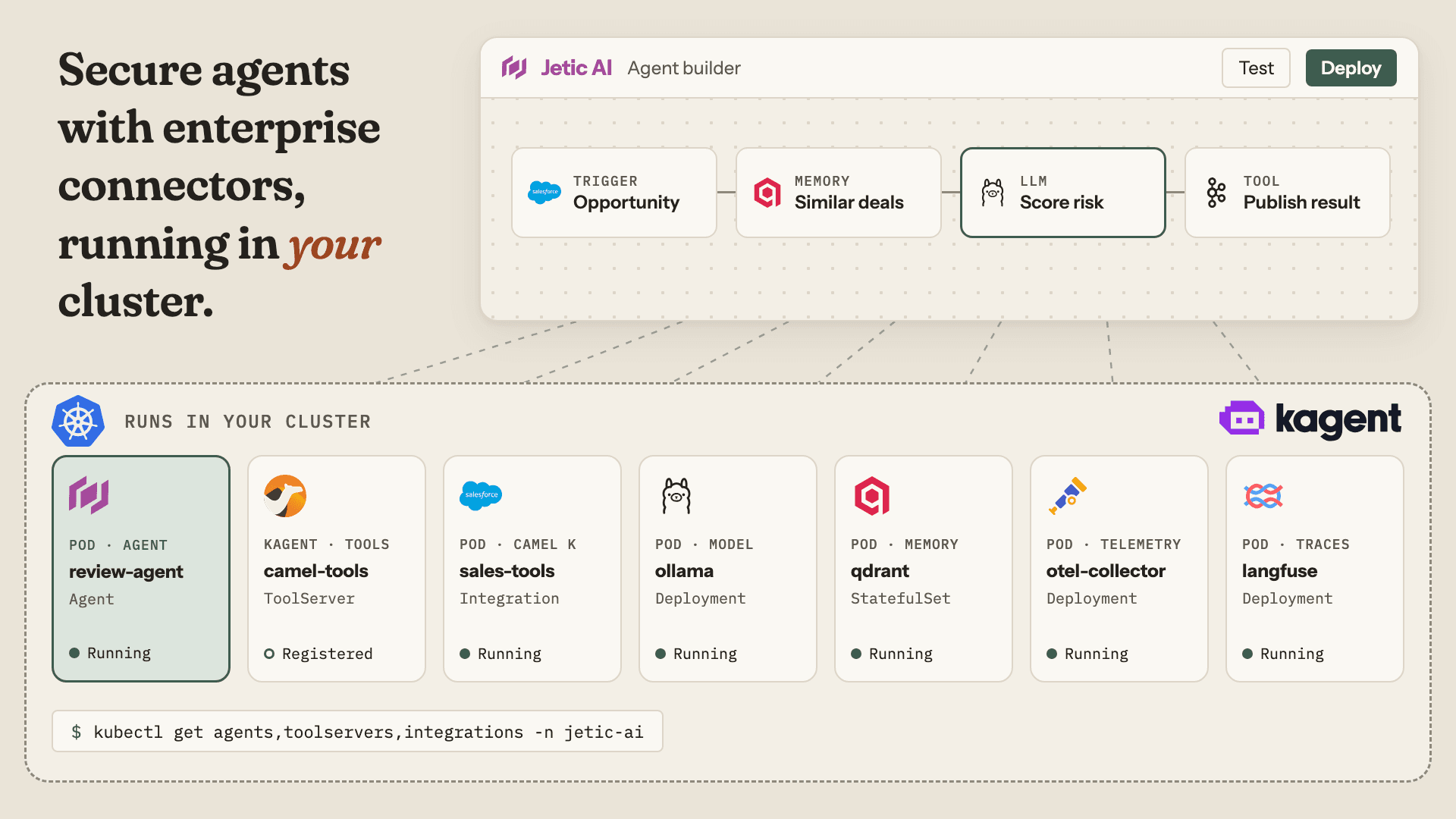
- Runs in your cluster. Agents deploy with kagent, an open-source framework that runs AI agents as Kubernetes resources, next to their tools, the model, the vector database and the tracing.
- Every step traced. OpenTelemetry collects the agent's traces, and Langfuse shows each tool call with its latency and cost.
- Open source throughout. Camel K, kagent, Qdrant, Ollama, OpenTelemetry and Langfuse are all open source. Nothing locks the customer in, and they can inspect or move every part.
The plan was to offer it first to companies already running Jetic. Before that, I researched the AI tooling landscape and what competing integration platforms were adding, defined the target customers and the positioning, and presented the idea to the whole company in internal demos.
The prototype
The prototype covers the whole journey: building an agent, testing it and deploying it. The contract-approval agent in it is one example, there to show the builder from start to finish.
Building an agent
Jetic AI builds agents the way Jetic builds integrations: visually, from scratch. Drag building blocks onto the canvas, connect them, and branch into different paths. If you're new to it, the Jetic Assistant guides you through. If you already know what you need, a preset gives you a finished agent to configure.
From building blocks
The blocks cover what an enterprise agent needs: apps such as Salesforce, SAP and Slack, data sources, models, memory, human approval steps, triggers, flow control and utilities. Each block says what it's for.
With the Jetic Assistant
Tell the assistant what you want to build, a chatbot for example, and it walks you through it one step at a time. At each step it explains what you need next and your options: a trigger that starts the agent, then where its knowledge comes from, then what it remembers. You learn the builder as you go.
From a preset
Presets are complete agents, such as the Enterprise Knowledge Assistant. Pick one and the whole flow is on the canvas. All that's left is configuring each block.
An example agent: contract approval
Here is a complete agent built in Jetic AI. It reviews a sales contract as soon as its Salesforce opportunity moves to contract review:
- Salesforce trigger: fires when the opportunity's stage changes to Contract Review.
- PDF parser: pulls the contract value and other fields out of the attached contract.
- Vector store query: finds the company policies and legal precedents that apply.
- Risk assessment LLM: scores the contract from 0 to 100 and explains the score.
- Decision router: sends it to auto-approval, human review or executive approval.
- Slack notification and analytics update: close every path.
Every block opens its own configuration. These are the dialogs, in the order the agent runs.
The trigger
Reading the contract
Finding similar contracts
Scoring the risk
You pick the model, its temperature and its token limit, then fill in three tabs. The system prompt sets the scoring rules. The user prompt passes in the contract, plus the similar contracts the vector store found. The response format defines the JSON the model has to return.
Routing
The three paths
Auto-approval updates the opportunity in Salesforce and emails the sales rep and the account owner, with the contract attached.
Human review opens a task for the legal team, due in two days. Every path posts to Slack, each with its own message.
Keeping score
Every run ends in analytics: the metrics to track, how each run updates the dashboard, and when to raise an alert.
Testing before deploying
An agent that approves contracts has to be tested before it goes live. The test panel has a scenario for each path: a $45,000 renewal on standard terms, a $180,000 implementation on custom terms, and an $850,000 partnership with unlimited liability. When you run a scenario, each step lights up on the canvas in turn. At the end you see the agent's answer, and its latency, cost and confidence compared with their targets. The video under The prototype shows the high-risk scenario.
Before deploying, a pre-flight checklist goes through every component, then the tests, performance benchmarks, a security scan and cost limits. The deploy panel names the agent and picks the environment, and once it's live the performance view shows calls, success rate, cost and response time.
How it runs
Your agents run in your own Kubernetes cluster, with enterprise connectors and a fully open-source stack. You keep full control of them, and every step is traced.